
Meet Tab Mute
A Chrome extension for people who are, regrettably, in more than one meeting at once.
Chrome Web Store · FreeInstall Meet Tab Mute Add to Chrome →The problem
You joined a second Google Meet call. Or you forgot to close the first tab. Either way, two rooms are now talking into your ears in stereo, and your brain, a remarkable organ, is not a multi-channel mixing desk.
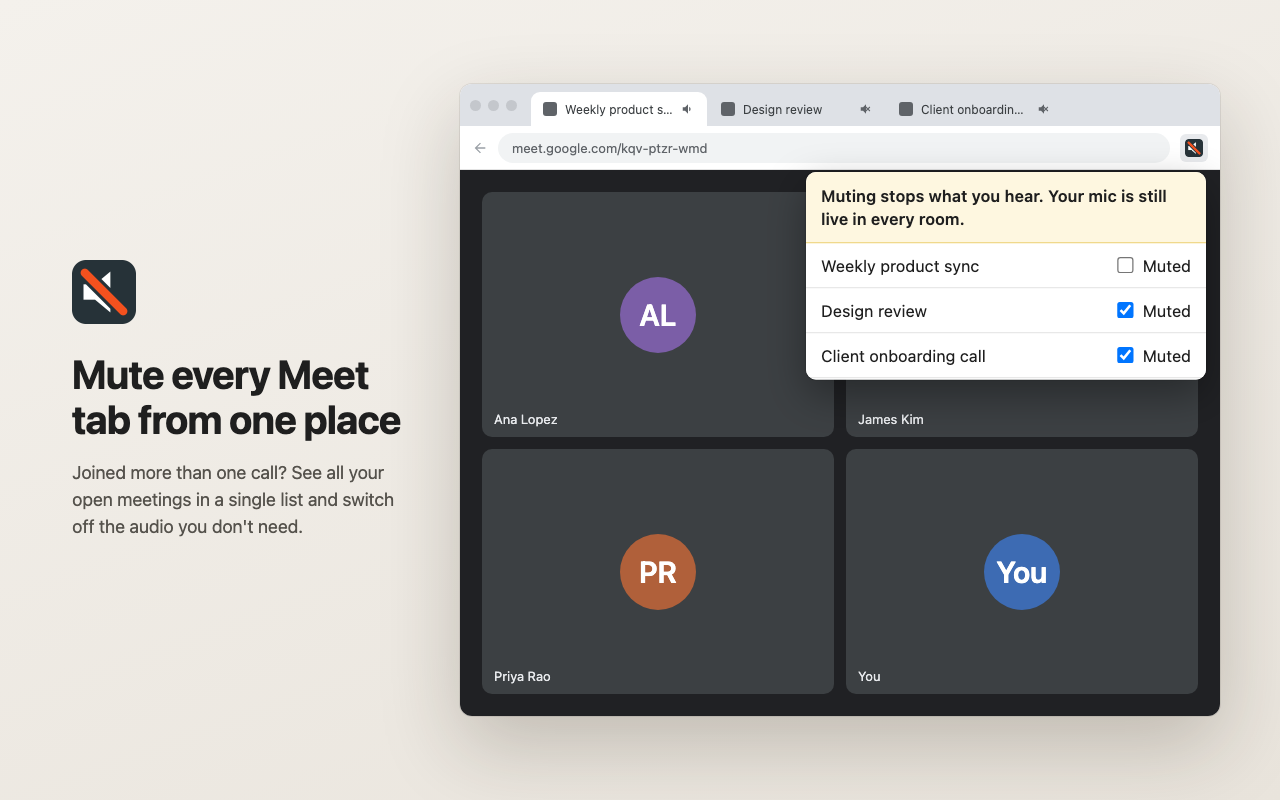
Hunting through tabs for the right speaker icon is a poor use of a finite life. Meet Tab Mute puts every Meet call in one list so you can silence the ones you are not currently pretending to attend.
How it works
- Click the toolbar icon.
- The popup lists every open Google Meet tab that is an actual meeting (URLs like meet.google.com/abc-defg-hij), by meeting title.
- Tick Muted to silence that tab's audio. Untick it to bring the sound back.
It uses Chrome's own built-in tab muting: the same mute you get by right-clicking a tab, just with less archaeology.
What it does NOT do
- It does not mute your microphone. It mutes what you hear, not what you say. The popup itself warns: "Muting stops what you hear. Your mic is still live in every room." People in the other meeting can still hear you, so use Meet's own mic button. This is a hearing aid in reverse, not an invisibility cloak.
- It does not inject scripts or read page content. Its only permission is host access to https://meet.google.com/*.
- It collects no data, stores nothing, runs no analytics, and has no network access at all.
- It does not touch video, chat, or participants.
- It does not make the meetings shorter. Sadly.
Important: read this before you get attached
A small tool with a small, unglamorous list of caveats. Please read all three.
- Keep Google Chrome updated. Always install Chrome updates promptly; they contain security fixes. Do not skip or delay a Chrome update to keep this extension working. Your browser's security matters more than a mute button.
- Chrome updates may break this extension. When Google updates Chrome, it may change or remove the browser functionality this extension relies on. If that happens, Meet Tab Mute may stop working, partly or entirely, without warning.
- No support, no fixes, no promises. Meet Tab Mute is free. No support, bug fixes, or remediation time is available or promised. If it breaks, it may stay broken. Keep the update anyway.
Privacy
Meet Tab Mute reads the titles and URLs of open Google Meet tabs on your device to display them in its popup. It stores nothing and sends nothing. It contains no analytics, no tracking, and no network code. It does not access meeting audio, video, chat, or participants.
This is also published as a standalone privacy policy.
Get it
Install it from the Chrome Web Store. Price: free.